Evony: The King's Return
Strategy4.1 out of 5
For Android & iOS · RiverGame
 Analysis by Gamesive
I find Top War: Battle Game most appealing when I treat it as a strategy game about steady decisions rather than a battle simulator. Its defining idea is that merging units and other items helps you upgrade, so progress comes through arranging, combining, and improving as much as through choosing when to fight. That makes it easier to dip into than a strategy game built around long, demanding sessions, but it also means players looking for deep battlefield tactics may find the moment-to-moment play lighter than expected.
RiverGame’s free strategy game has a 4.6 average from around 791,000 ratings and has passed 50 million installs. Those figures suggest a broad audience, though they don’t tell you whether its particular mix of merging and warfare will suit you. I would describe it as a casual-minded entry into the strategy genre: there is a sense of building toward greater strength, but the central appeal is the upgrade loop, not detailed control of every encounter.
The main strength is how merging gives routine progression a hands-on feel. Instead of treating every improvement as an abstract number going up, the game asks me to bring matching pieces together and turn them into something stronger. That simple action makes the next upgrade easy to understand, and it gives short play sessions a clear purpose: make a useful merge, tidy up the board, and decide what to develop next.
That structure also lowers the entry barrier. Traditional strategy games can ask new players to learn a dense set of menus, unit counters, and resource rules before they feel competent. Here, the merge mechanic offers an immediately legible starting point. I can see what is being combined and why the result matters, which makes it less intimidating than a strategy title that puts a large map and a stack of unfamiliar systems in front of me at once.
The trade-off is that simplicity can make choices feel narrower. Combining items is satisfying, but the basic act is not automatically a strategic puzzle. Its value depends on how well I manage space, timing, and priorities rather than on the merge animation itself. I get more from the loop when I pause to ask which upgrade helps my current plan, instead of merging everything as soon as a match appears.
A useful habit is to think one step beyond the available merge. If I combine the first matching pieces I see, I may clear the board but miss a more valuable sequence. Keeping track of what I am trying to improve helps turn a repetitive action into a small planning decision. That is not a substitute for deep tactical combat, but it is a practical way to make the game’s central mechanic feel more deliberate.
Top War works best for me as a game I can revisit briefly, rather than one that demands a dedicated evening. A realistic use case is opening it during a break, checking what can be upgraded, making a few merges, and leaving once I have a clear next step. The loop is easy to re-enter because its central action is straightforward; I do not have to rebuild a complicated mental model every time I return.
That convenience has an important limit: a short-session-friendly structure can still encourage frequent checking. If I prefer games that feel complete after one self-contained match, ongoing upgrading may feel less satisfying. I would approach it as a gradual project, not as a game that necessarily delivers a neatly wrapped tactical challenge every time I open it.
When progress feels stalled, I find it more useful to identify the bottleneck than to tap through every available action. Ask what you are actually trying to improve, then use merges toward that aim. This keeps the board from becoming a collection of upgrades with no clear purpose and helps make each short session feel like it contributed to something specific.
Compared with conventional mobile strategy games, Top War places a more visible emphasis on combining and upgrading. In a map-focused strategy game, much of the satisfaction often comes from reading terrain, planning movement, and anticipating an opponent. Here, the merge loop is the more distinctive hook. I would choose it when I want strategy-flavoured progression with a simple interaction, and choose a more tactical alternative if I want every encounter to hinge on positioning and unit-by-unit decisions.
It also differs from a pure puzzle game. Merging is central, but the framing is military strategy rather than an isolated sequence of matching challenges. That context gives upgrades a larger sense of purpose, though players who want a clean puzzle with a predictable end point may prefer a game built specifically around solving boards. The key question is whether you enjoy making incremental improvements as part of a broader war-game theme.
For someone new to strategy games, that middle ground is a strength. The merge action gives you something concrete to do while you become familiar with the larger progression. For a veteran of complex strategy titles, however, the same accessibility may feel like a ceiling. I would not recommend it as a replacement for a demanding strategy game if the main thing you enjoy is mastering intricate combat systems.
The biggest friction is the gap between the word “strategy” and what a player may expect from it. If you arrive expecting fine-grained command over battles, you may find the upgrade routine more prominent than the tactical decisions. I would go in expecting a merge-led progression game with a war theme, rather than assuming that every fight will require careful manual planning.
There is also a spending consideration. The game is free to start, but it includes in-app purchases ranging from $0.99 to $99.99 per item. That broad range makes it sensible to decide your own spending boundary before you play, especially if you are the sort of player who is tempted to pay whenever progress slows. I recommend treating purchases as optional conveniences rather than as part of the basic cost of trying the game.
For younger players and families, the age guidance is Everyone 10+. I would still make the usual family decision based on the player and how they handle optional purchases, rather than treating an age label as a complete guide to whether a game is a good fit. The game’s strategy framing and accessible merging may appeal to a range of players, but its ongoing progression is best for someone who enjoys returning to a project.
The current version is 1.686.0, and the minimum operating system requirement is Android 7.0. It was released on January 16, 2020. Those details make it a long-running mobile game rather than a new experiment, while the version information is useful if you are checking whether your device meets the stated Android requirement. I would still make sure my device’s software is compatible before installing.
I would recommend it to players who like visible progress, enjoy combining matching pieces, and want a strategy-themed game they can approach in small windows of free time. It is especially suitable if conventional strategy games feel too demanding but you still want your upgrades to connect to a larger military setting. The straightforward core action gives you a low-friction way to begin, while the gradual improvement provides a reason to return.
I would suggest skipping it if you dislike repetitive upgrade loops, want every session to have a decisive ending, or measure strategy games mainly by complex combat choices. A dedicated tactical game is a better fit for players who want careful battlefield control. A focused merge puzzle is a better fit for those who enjoy combining pieces but do not want the wider war-game progression around them.
One practical way to decide is to play with a clear personal goal: spend a few sessions noticing whether you enjoy planning upgrades, not just performing merges. If the satisfaction comes from choosing what to improve and seeing that choice pay off, the core loop is doing its job for you. If the actions begin to feel like housekeeping, the game’s central appeal may not be strong enough to overcome its repetition.
Top War: Battle Game succeeds most when it keeps its promise of approachable, merge-led strategy. I like that it makes upgrading tangible and gives short sessions a straightforward focus. I am less convinced by it as a choice for players seeking deep tactical battles, because its appeal rests more on the progression loop than on intricate combat decision-making.
RiverGame has made a free game with a clear identity, and its popularity is easy to understand: merging is simple to grasp, while the strategy setting gives that activity a broader goal. Still, its in-app purchases and incremental structure are worth weighing before you commit. My recommendation is specific: try it if you enjoy building strength through small, planned improvements, but choose another strategy game if you want a demanding battlefield puzzle. For the right player, it is an easy game to pick up and a steady one to revisit.
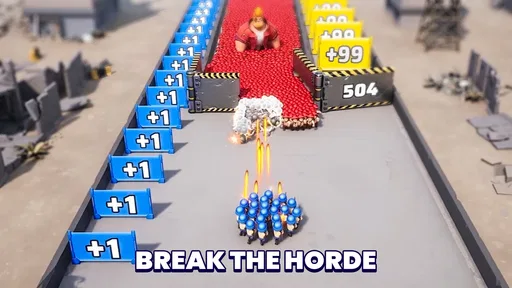
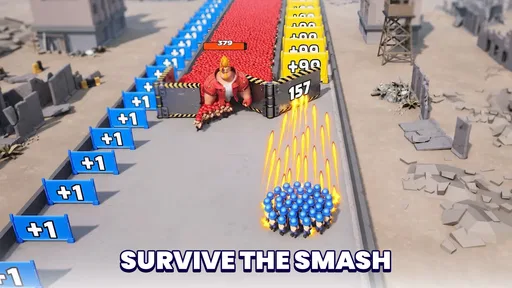
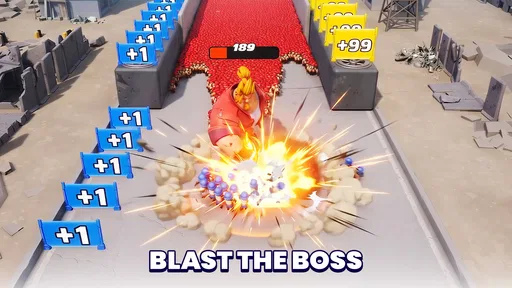
Top War: Battle Game is a mobile strategy game that combines base building, troop collection, and real-time battles. You develop a base, recruit heroes, gather resources, and strengthen your army. A distinctive feature is its merge system: combining matching buildings or units can upgrade them without waiting for the usual construction timers. The game also includes campaign stages and multiplayer activities, so progress involves both planning your base and competing with other players.
You can download and play Top War: Battle Game for free, but it offers optional in-app purchases. These may provide currencies, items, or progression advantages, while regular play lets you earn resources and improve your account over time. Progress can become slower as you advance, and spending may help players move faster. Before installing, check the current store listing for purchase details and consider using device-level purchase controls if children may play.
Top War: Battle Game is primarily an online game, so you should expect to need an internet connection for core features. Multiplayer battles, alliance activities, account syncing, and access to game events depend on connecting to the servers. Some previously loaded screens may remain accessible briefly, but the game is not designed as a complete offline experience. A stable connection is recommended, especially during competitive activities, and server availability or maintenance can temporarily affect access.
Yes. Multiplayer is an important part of Top War: Battle Game, with features that let you join an alliance, cooperate with other players, and participate in competitive events or battles. Alliances can provide social support and shared goals, making them useful for players who want to progress beyond solo campaign content. Activity and rules vary between groups, so it is worth finding an alliance that fits your schedule and preferred play style. Some events may require regular participation.
Suitability depends on the child and the family’s preferences. The game features cartoon-style military combat, online interactions, and optional in-app purchases. Because it connects players with others, parents should review the available chat and privacy settings and discuss safe online behavior. Purchases can be restricted through the device’s parental controls. Check the current Google Play or Apple App Store age rating and privacy information, since ratings, features, and policies may differ by region or change over time.
On Android, Top War: Battle Game asks for these permissions.
Top War: Battle Game is also available in 2 other languages on our site.
4.6 out of 5
791,296 reviews
Strategy · RiverGame
Strategy4.5 out of 5
Strategy4.4 out of 5
Strategy3.7 out of 5
Strategy4.5 out of 5
Strategy4.8 out of 5

Strategy4.1 out of 5
Strategy4.1 out of 5
Strategy4.5 out of 5

Strategy4.1 out of 5
Strategy4.5 out of 5
Strategy4.2 out of 5
Strategy4.6 out of 5

Strategy4.4 out of 5
Strategy4.1 out of 5

Strategy4.6 out of 5

Strategy4.4 out of 5
Strategy4.5 out of 5

Strategy4.4 out of 5



Gamesive reviews games on its own and is not paid by developers for scores. We do not host game files: the download buttons open the official Google Play and App Store pages. Names, icons and screenshots belong to their owners.