
Kpop Piano Beats - Music Game
For Android & iOS · Sonata Studio: Piano Rhythm
- 4.7 out of 5Rating
- 494.24KReviews
- 10.00M+Downloads
- MusicGenre
Game details
- Version
- 5.10.0
- Updated
- Requires
- 7.0
- Price
- Free
- Age rating
- Everyone 10+
- In-app purchases
- $0.99 - $2.99 per item
Screenshots


Kpop Piano Beats - Music Game review
 Analysis by Gamesive
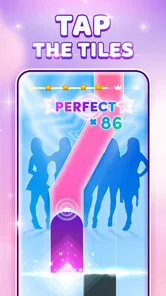
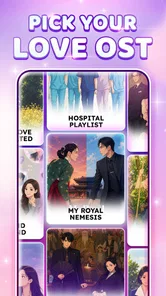
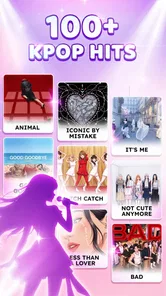
Kpop Piano Beats is a music game built around a simple invitation: tap the tiles in time with K-pop piano music, build your score, and enjoy the rhythm. I like the clarity of that idea. It puts the music and the timing challenge front and center, so the appeal is easy to understand whether you are a longtime K-pop listener or simply looking for a casual rhythm game. The game is free to play, with optional in-app purchases, making it straightforward to try before deciding whether it suits you.
Music first, with a simple rhythm challenge
The basic loop is familiar to anyone who has tried a piano-tile game: follow the moving tiles, tap in rhythm, and aim for a stronger score. The store description highlights K-pop piano music, tile tapping, scoring, and dancing along to the beat. That gives the game a focused identity rather than presenting it as a broad music player or a deep simulation. I find that directness appealing: the fun is in staying attentive and matching the song’s pulse.
As a K-pop rhythm game, it has an obvious pick-up-and-play quality. You do not need a long explanation to understand what the central action asks of you. The challenge comes from listening, watching the tiles, and responding at the right moment. That combination can make even a simple round feel engaging, especially when a familiar musical style gives the tapping a bit of extra personality.
The game’s short description, “Kpop Piano Beats,” captures the experience neatly. It suggests a music-focused arcade game rather than a full piano-learning tool, and that distinction matters. I would approach it as entertainment for quick sessions, not as a substitute for lessons or a way to study songs in depth. Its stated emphasis is on play, score, and rhythm, which is exactly the kind of uncomplicated goal that can work well on a phone.
What playing is about
In practice, the core appeal is the connection between sound and action. Each tile is a prompt to keep your attention on the beat and react promptly. When I think about the sort of player this suits, I picture someone who enjoys quick tests of timing and concentration, or a K-pop fan who wants a lightweight game with music at its center. It is also approachable for people who do not want to learn complicated controls before getting started.
The score gives each attempt a clear outcome. You can focus on doing better from one play to the next, but the basic pleasure is simply keeping pace with the music. That balance is useful: players who enjoy chasing a stronger result have a reason to concentrate, while casual players can treat a round as a short musical diversion. The game’s premise does not need elaborate explanation, and that helps it fit naturally into spare moments.
There is a certain satisfaction in a rhythm game that asks you to listen as well as look. Tapping tiles can sound mechanical on its own, but the musical framing gives the action a theme and a sense of momentum. For me, that is the strongest part of the concept. The tiles are not just objects to hit; they are the interface for playing along with a beat.
A casual game with a clear audience
The game is free, and its age rating is Everyone 10+. It has reached more than ten million installs, with an average rating of 4.7 from around 494,000 ratings. Those figures suggest that it has found a substantial audience, though they do not tell you whether its particular rhythm style will match your taste. The most useful test is whether you enjoy listening closely and tapping accurately.
Its strongest draw is the easy-to-grasp mix of K-pop piano music and tile-tapping play. That can be a good fit for short breaks, casual play, or anyone who wants a music game that gets to its central activity quickly. It is less naturally suited to players who are looking for a complex campaign, extensive music-production tools, or detailed piano instruction; those are different kinds of experiences from the one the game describes.
Spending, progress, and fairness
Because the game is free to download and play, the purchase question is worth considering before you settle in. In-app purchases are available, with items priced from $0.99 to $2.99. That is the confirmed spending context: the game offers optional paid items within a free experience. I would keep that distinction in mind and decide for myself whether any purchase is worthwhile rather than assuming that spending is necessary to enjoy the basic rhythm challenge.
For a game centered on scores and timing, progress can feel personal. You may want to improve your performance, get more comfortable with the beat, or simply enjoy another attempt. However, no specific progression system or purchase effect is established here, so it would be unfair to claim that paid items speed advancement, unlock particular songs, change scoring, or affect difficulty. The sensible approach is to treat the purchases as optional and judge them only by what the game actually presents when you play.
This is also where expectations help. If you are downloading a free music game, it is reasonable to check the in-game purchase prompts and their descriptions before buying anything. The listed item range gives you a broad sense of the available price points, but it does not reveal what each item contains. I would avoid spending on impulse and make sure an item’s purpose is clear to you first.
Competition and a fair-minded view
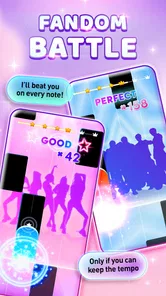
Score-chasing can make rhythm games feel competitive, even when the main contest is with your own previous result. Fairness depends on how scores are calculated and how the game handles any competitive features, but those details are not established here. So I would not label the experience pay-to-win or claim that purchases do, or do not, provide a competitive advantage. There simply is not enough confirmed information to make that judgment responsibly.
That uncertainty does not prevent a useful first impression. The stated gameplay is about tapping tiles, collecting score, and moving with the rhythm. On that basis, the central skill sounds like timing and attention. But whether scores are compared with other players, whether any rankings exist, and whether paid items influence those systems are questions to check inside the game if competitive fairness matters to you.
I prefer that cautious approach to making a confident claim from the price range alone. Optional purchases do not automatically mean an unfair game, just as a free download does not prove that every part of play is equally accessible without spending. For now, the trustworthy conclusion is narrower: the game is free, in-app purchases cost between $0.99 and $2.99 per item, and the precise relationship between purchases and competitive play is not confirmed.
What to check for yourself
Before buying anything, read the item descriptions in the app and consider whether the purchase adds something you genuinely want. If your priority is simply to try the rhythm gameplay, start with the free experience and see whether the music and tile timing hold your attention. That is a practical way to assess the game without assuming that purchases are required or that they provide a particular benefit.
It is equally sensible to notice how the game feels during ordinary play. Do the taps feel responsive to you? Is the pace enjoyable, and does chasing a score make you want another round? Those are personal questions, but they matter more than a purchase decision made before you know whether the basic loop is satisfying. A free first try lets you answer them at your own pace.
Who may enjoy it
Kpop Piano Beats is most appealing to players who want an accessible music game with a clear K-pop identity and a straightforward tapping challenge. K-pop fans may enjoy the musical framing, while rhythm-game newcomers can appreciate how quickly the central action is explained. If you like focusing on a beat and trying to improve your timing, the concept has a solid, uncomplicated hook.
It may be a less natural match if you expect a full piano course, a detailed music library with a particular confirmed track list, or a competitive system with clearly documented rules. Those expectations go beyond the confirmed description. I would install it for the rhythm play it promises, rather than for features that have not been established.
The game was released on August 30, 2023, and its current version is 5.10.0. It supports Android 7.0 and later. These details are useful if you are checking compatibility, while the free price makes trying it relatively simple. Its large audience and strong average rating can offer some context, but ratings remain a guide rather than a guarantee that every player will enjoy the same songs or style.
My trust verdict
My overall view is positive but measured. The concept is easy to grasp, the music-and-tile format gives it a clear purpose, and the free entry point makes it approachable. The purchase range is also stated plainly enough to set an initial expectation: optional items cost from $0.99 to $2.99 each. What remains unclear is how those purchases relate to progression or competition, so I would not draw conclusions about fairness beyond the facts that are known.
If you want a casual piano rhythm game built around K-pop music, this is a reasonable one to try. Go in expecting a focused tapping experience, pay attention to purchase descriptions before spending, and judge the rhythm gameplay for yourself. That combination of clear expectations and a free starting point is what makes the game easiest to recommend: it offers a simple musical challenge without requiring you to commit money before deciding whether its style clicks.
What we like
- Quick tap-based rounds are easy to learn.
- K-pop tracks add energy to rhythm gameplay.
- Multiple difficulty levels suit different skill levels.
- Short sessions work well for casual play.
- Piano-style play offers a fresh take on music games.
What could be better
- Fast note patterns can feel unforgiving.
- Touch controls may miss taps on smaller screens.
- Song selection may not satisfy every K-pop fan.
- Repeated play can make some tracks feel familiar.
- Ads may interrupt the flow between rounds.
Frequently Asked Questions
What is Kpop Piano Beats - Music Game?
Kpop Piano Beats - Music Game is a rhythm game built around tapping piano-style tiles in time with music. It is aimed at players who enjoy K-pop and casual music challenges, with songs and note patterns that test timing and concentration. The exact track list, modes, and available features can vary by app version, so check the current store listing before downloading.
How do you play Kpop Piano Beats - Music Game?
You follow notes moving across the screen and tap the corresponding tiles as they reach the target area. Accurate, well-timed taps help you maintain a streak and earn a better score, while missed or mistimed notes can interrupt your run. The basic controls are simple to learn, but faster sections may take practice. A touch screen that responds reliably can make the experience more comfortable.
Does Kpop Piano Beats - Music Game include real K-pop songs?
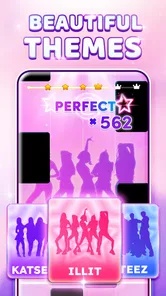
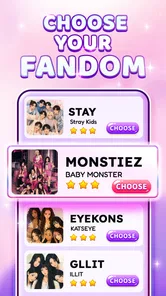
The game is presented as a K-pop-themed music experience, but the songs and their licensing can depend on the version, region, and updates available to you. Do not assume that every popular K-pop track or artist is included. Review the screenshots, description, and recent user feedback on the official app store page to see what music is currently offered before installing.
Can I play Kpop Piano Beats - Music Game offline?
Offline availability may depend on how the game loads its songs and whether content needs to be downloaded first. Some music games allow previously loaded tracks to work without an internet connection, while other features, advertisements, or updates may require connectivity. If offline play matters to you, check the app’s current description and test a downloaded song before relying on it during travel.
Is Kpop Piano Beats - Music Game free, and are there ads or in-app purchases?
The app may be free to download, but that does not necessarily mean every feature or song is available without limits. Free music games can include advertisements, optional purchases, or unlock systems, and these details may change with updates or by region. Check the Google Play or Apple App Store listing for current pricing, in-app purchase information, age guidance, and privacy details before downloading.
Permissions
On Android, Kpop Piano Beats - Music Game asks for these permissions.
- Wi-Fi connection information
- view Wi-Fi connections
- Other
- view network connections, full network access, change your audio settings, control vibration, prevent device from sleeping
Languages
Kpop Piano Beats - Music Game is also available in 1 other languages on our site.
ItalianoKpop Piano Beats - Music Game
User reviews
4.7 out of 5
494,241 reviews
- 85%
- 8%
- 4%
- 1%
- 2%
Download Kpop Piano Beats - Music Game
Music · Sonata Studio: Piano Rhythm · Free
Games like Kpop Piano Beats - Music Game
View all: Games like Kpop Piano Beats - Music Game
Tiles Hop Music & Ball Game
Music4.3 out of 5
Magic Tiles 3™ - Piano Game
Music4.6 out of 5
Music Piano 7: Rush Song Games
Music4.8 out of 5

Magic Dancing Tiles
Music4.8 out of 5
About this listing
- Game
- Kpop Piano Beats - Music Game
- Developer
- Sonata Studio: Piano Rhythm
- Package
- com.ningningstudio.kpopmagictiles
- Version reviewed
- 5.10.0
Gamesive reviews games on its own and is not paid by developers for scores. We do not host game files: the download buttons open the official Google Play and App Store pages. Names, icons and screenshots belong to their owners.