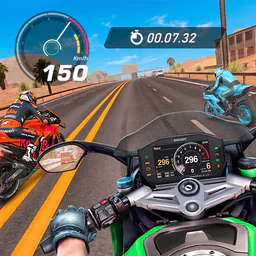
Go Speed: Street Rider
For Android · SoftAIO
- 3.9 out of 5Rating
- 549.00Reviews
- 1.00M+Downloads
- RacingGenre
Game details
- Version
- 1.0.8
- Updated
- Requires
- 7.0
- Price
- Free
- Age rating
- Everyone 10+
- In-app purchases
- $0.99 - $19.99 per item
Screenshots
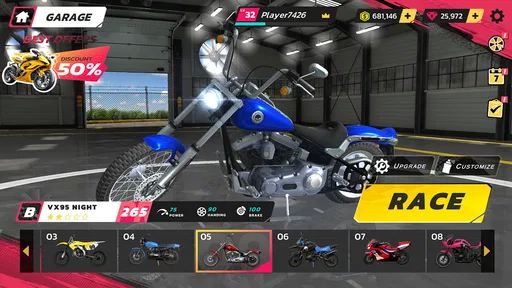
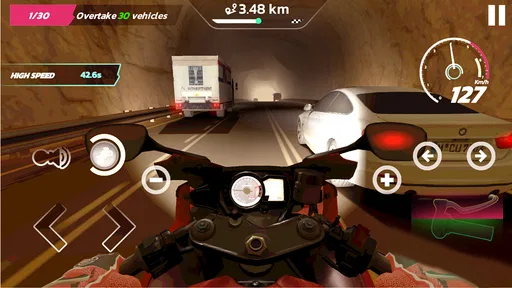
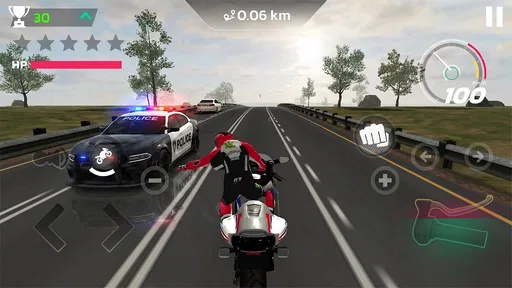
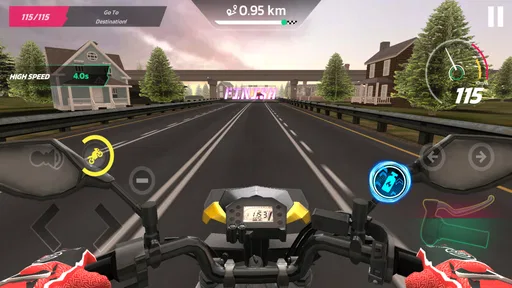
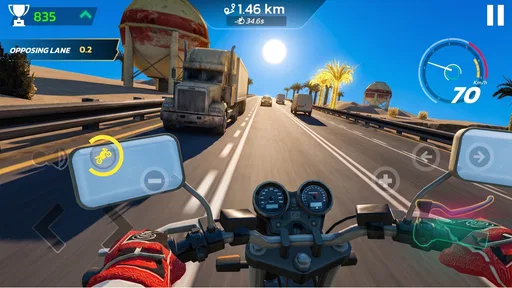
Go Speed: Street Rider review
 Analysis by Gamesive
When a phone gets passed around the household, a racing game has to make sense quickly and stay enjoyable in short turns. Go Speed: Street Rider looks aimed at that kind of casual session: it is a free racing game from SoftAIO, with the brief promise of a quick ride rather than a detailed simulation. I’d consider it for someone who wants an easy game to pick up between errands, but I would not choose it expecting the depth or careful driving feel of a major racing series.
How it fits a shared phone
The practical appeal of a lightweight racing game is that a family member can hand over the device and let the next person take a turn without needing to learn a long campaign first. That is the use case I’d keep in mind here. The name and store description suggest street-focused speed, but I would treat the experience as a casual arcade-style option rather than assume it offers particular tracks, cars, or modes.
For a shared device, the first useful check is simple: let each person try a short session and see whether the controls feel comfortable on that screen. Racing games can be frustrating when a player has to fight the interface instead of steering, especially for younger or less experienced players. I’d test it before making it the default game for a group, and I’d keep turns brief until everyone knows whether they enjoy its pace.
That small trial also helps settle an everyday question: is this a game people will return to, or a novelty they try once? A quick race can be a good way to fill a short wait, while a household looking for a shared activity with long-term goals may want something with a clearer progression loop or direct multiplayer. I would not assume either feature is present without checking the current build.
Set expectations before handing over the phone
Go Speed: Street Rider is at version 1.0.8, and its Android minimum is 7.0. Those details make compatibility worth checking before a family installs it on an older spare phone or tablet. The age rating is Everyone 10+, so I’d use that as a starting point for a parent’s decision, not as a substitute for looking at the game together and deciding whether its tone suits a particular child.
The game is free to install, but it includes in-app purchases ranging from $0.99 to $19.99 per item. That matters more on a shared device than it might on a phone used by one adult. Before handing it to a child, I’d review the device’s purchase settings and make sure the account holder understands that optional spending may be available. The sensible household rule is to agree on purchases in advance rather than rely on a child to infer the boundary from the game itself.
I also recommend making the account boundary explicit. If several people use one device, decide whose app-store account is active and who is allowed to approve purchases. That is ordinary device housekeeping, not a special feature of the game. It prevents an enjoyable quick race from turning into confusion about who downloaded it or who is responsible for an accidental transaction.
Make turns easy to coordinate
On a shared phone, coordination is often more useful than a complicated schedule. I’d agree on a simple turn-taking rule before starting: one short session each, then pass the phone along. This keeps the game from monopolizing the screen and gives younger players a clear expectation. If the group wants to compare results, agree to do so only if the game visibly provides a suitable way to track them; I would not promise shared leaderboards, saved profiles, or local competition.
A useful tip is to avoid switching players in the middle of a run. Even in games built for quick action, taking the device away while someone is steering can feel unfair and may spoil the session. Let the current player finish, then hand it over. If the game’s progress or settings appear tied to the device rather than individual people, keep expectations modest: a shared installation does not automatically mean separate profiles or private progress.
For a parent or older sibling, the best coordination habit is to try the game first and then explain the controls in plain language. A short demonstration can prevent a younger player from repeatedly tapping menus or changing settings while trying to drive. It also gives the adult a chance to judge whether the game’s pace is manageable and whether the display is comfortable on the device being shared.
What its audience and popularity suggest
The game has a 3.9 average rating from 549 ratings, with 20 written reviews, and it has passed 1M+ installs. I read that as evidence that it has reached a substantial audience, but not as proof that every player will find it polished or satisfying. Ratings are a useful temperature check; for a racing game, the more personal question is whether its handling and session length suit the people who will actually use it.
SoftAIO is the developer, and the game sits squarely in racing. That makes it easy to compare with the usual alternatives: a more simulation-oriented racer is a better fit if you want realistic handling and careful vehicle tuning, while a kart racer may suit a group looking for playful competition and recognizable power-ups. Go Speed: Street Rider is the option I’d sample when the priority is a straightforward street-racing theme and a low-commitment download, rather than a deep collection of systems.
For a household with mixed ages, the Everyone 10+ rating is a helpful signal, but I would still preview the game. Rating labels do not tell you whether a specific child will find the action too intense, whether the controls are accessible to them, or how they will respond to optional purchases. Playing together briefly answers those questions better than assuming the rating settles them.
Where the trade-offs matter
The clearest limitation is uncertainty about how much depth a particular player will want. A person who enjoys practicing precise racing lines, adjusting a garage, or building a long career should compare this with a more established racer before investing much time. Likewise, someone looking for a guaranteed shared multiplayer experience should verify the available play options in the installed version rather than treat the racing label as evidence of head-to-head play.
Free entry is convenient, but the purchase range means I would not describe the experience as automatically cost-free in the long run. A household can avoid unwanted spending by setting device-level purchase approval and agreeing that nobody buys anything without asking. That approach is especially helpful when children and adults share the same account or screen, because the game’s price at installation and optional purchases are two different decisions.
There is also a difference between a game that is easy to start and one that is easy for everyone to enjoy. A casual racer may work well for someone who likes quick bursts of action, but it may not suit a player who gets frustrated by touch controls or wants a slower, more forgiving experience. I’d treat the first session as a test rather than assume that a street-racing theme will appeal to every person in the house.
My household verdict
I’d recommend Go Speed: Street Rider as a game to try on a shared device when the household wants a casual racing diversion and is comfortable checking purchase settings first. Its free installation lowers the commitment, and its broad reach suggests it has found an audience. The 3.9 average is more mixed than glowing, so I’d let the controls and feel of the actual session decide whether it earns a place on the home screen.
It is not my first choice for families who need separate player accounts, a confirmed multiplayer format, detailed racing progression, or a game with no optional spending. In those cases, I’d look for an alternative whose specific features match the household’s needs and verify them before installing. For everyone else, the practical approach is simple: check compatibility, set a purchase boundary, try a short turn together, and keep it only if the people sharing the phone genuinely enjoy the ride.
What we like
- Simple controls make it easy to start riding.
- Quick races suit short gaming sessions.
- The street racing theme gives rides a clear focus.
- Unlockable bikes offer a reason to keep playing.
- A lightweight arcade style feels accessible to casual players.
What could be better
- Repeated race formats can feel predictable.
- Progress may require considerable time or repeated races.
- Touch controls can make precise steering difficult.
- Limited depth may disappoint simulation fans.
- Advertisements or in-app purchases may interrupt play.
Frequently Asked Questions
What is Go Speed: Street Rider, and what do you do in the game?
Go Speed: Street Rider is a mobile driving game focused on fast-paced street racing. You take control of a car, steer through traffic, and try to cover distance while avoiding collisions. The basic appeal is the quick, action-oriented driving rather than a detailed simulation. Exact modes and objectives can vary by version, so check the current store listing to see what is included before downloading.
Is Go Speed: Street Rider free to download, and does it include ads or in-app purchases?
The game may be available to download without an upfront charge, but that does not necessarily mean every part of the experience is free. Mobile games can include advertising, optional purchases, or other monetization, and these details may differ between platform versions or updates. Review the Google Play or App Store listing, including its price and in-app purchase information, before installing, especially if the device is used by a child.
Can I play Go Speed: Street Rider offline?
Whether Go Speed: Street Rider works without an internet connection may depend on the version and the feature you want to use. Core driving gameplay may be available offline in some releases, while ads, online features, or other services typically require connectivity. If offline play is important, check the latest store description and test the game before relying on it during travel. Also note that updates and downloads require an internet connection.
What devices are compatible with Go Speed: Street Rider?
Compatibility depends on the requirements set for the specific Android or iOS release, as well as the operating system version and available storage on your device. Check the app’s store page for supported operating systems and any listed device requirements before downloading. If the game is unavailable in your region or does not appear in search, it may not currently be offered for your device or account.
Is Go Speed: Street Rider suitable for children, and what should parents check?
Suitability depends on the game’s content, advertising, and purchase options, not just its racing theme. Before allowing a child to play, review the age rating and content notes on the relevant app store, and check whether the game contains ads, in-app purchases, or online features. Parental controls can help restrict spending and downloads. Ratings and monetization details may differ between Android and iOS versions.
Permissions
On Android, Go Speed: Street Rider asks for these permissions.
- Other
- view network connections, full network access, prevent device from sleeping, Google Play license check
User reviews
3.9 out of 5
549 reviews
- 69%
- 2%
- 2%
- 4%
- 22%
Download Go Speed: Street Rider
Racing · SoftAIO · Free
Games like Go Speed: Street Rider
View all: Games like Go Speed: Street Rider
Race Master 3D: Car Racing
Racing4.6 out of 5

Car Race
Racing4.6 out of 5

Epic Plane Evolution
Racing4.1 out of 5

Car Crash Simulator: Mountain
Racing3.5 out of 5
About this listing
- Game
- Go Speed: Street Rider
- Developer
- SoftAIO
- Package
- com.gospeed.street.rider
- Version reviewed
- 1.0.8
Gamesive reviews games on its own and is not paid by developers for scores. We do not host game files: the download buttons open the official Google Play and App Store pages. Names, icons and screenshots belong to their owners.