
Fortnite
For Android · Epic Games, Inc
- 4.6 out of 5Rating
- 529.20KReviews
- 10.00M+Downloads
- ActionGenre
Game details
- Version
- 42.40.0-59343437-Android
- Updated
- Requires
- 8.0
- Price
- Free
- Age rating
- Teen
- In-app purchases
- $0.99 - $89.99 per item
Screenshots
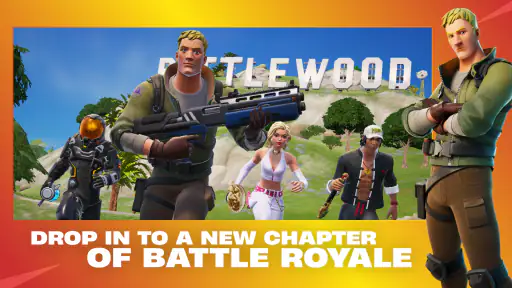
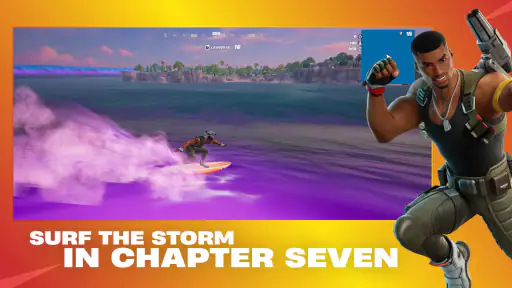
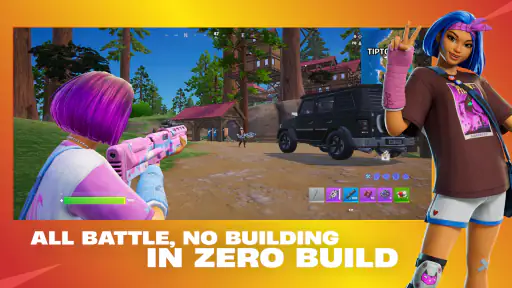
Fortnite review
 Analysis by Gamesive
I think Fortnite makes the most sense when you want an action game that can shift between a serious match and a casual hangout. It is free to start, built around online competition, and broad enough to offer more than one reason to open it. That flexibility is a real advantage, but it comes with a trade-off: the experience is less appealing if you want a quiet, self-contained game or dislike the pressure of competing with other players.
My recommendation depends less on whether you enjoy action games in general and more on what you want from one. If your ideal session means joining friends, learning a familiar map, and adapting as a match unfolds, this is an easy game to consider. If you prefer a campaign with a steady story, or a simple game that asks little attention, I would look elsewhere.
What to decide before you install
Fortnite is an action game from Epic Games, Inc, with a Teen content rating. It is free to download, though optional in-app purchases range from $0.99 to $89.99 per item. That makes the initial decision straightforward, but it is worth setting expectations: free access does not mean every optional purchase will feel irrelevant to every player, especially if you are playing alongside friends who enjoy customizing their experience.
The game’s audience is substantial: it has more than 10 million installs and an average rating of 4.6 from around 529,000 ratings. Those figures suggest broad appeal, not a guarantee that it will suit your phone, habits, or taste. Its current Android version is 42.40.0-59343437-Android, and it requires Android 8.0 or later. Before committing time to it, check that your device meets that requirement and that you have room for a demanding online game.
The most useful question is how you like to spend a gaming session. Fortnite is a stronger fit if you enjoy reacting to changing situations and improving through repeated attempts. It is less suited to someone who wants a predictable pace, a clear ending, or a game that remains enjoyable without a connection to other players. I would also think about whether you want to play alone or with friends; the social side can make the game feel much more welcoming, but it is not a requirement for every session.
A match rewards attention, not just quick reactions
What I find engaging is the way a match asks you to make several small decisions rather than rely on one repeated action. You have to judge when to move, when to take a risk, and when a fight is not worth pursuing. That gives each session a different rhythm, even when the basic goal is familiar. A good result often comes from staying aware and making sensible choices, not simply charging toward every encounter.
For a newer player, I would treat early sessions as practice rather than a test of skill. Focus on learning how movement feels, how to keep track of nearby threats, and what tends to make you lose a fight. Changing one habit at a time is more useful than trying to imitate an experienced player all at once. This is a practical advantage of a game built around repeat matches: you can take one lesson from a loss and apply it immediately.
One detail that is easy to overlook is how much the mood of a session depends on your goal. If you enter every match expecting to win, a rough start can make the game feel punishing. If you instead choose a small aim—stay alert, explore a different route, or coordinate better with friends—you can get something worthwhile from a session that does not end in a victory. That shift makes the game easier to enjoy over time.
Playing with friends changes the value of the game
Fortnite can work as a social choice when a group wants an activity that still gives everyone something to do. Friends can compete, talk through decisions, and turn an ordinary evening into a shared routine. In that setting, the game’s appeal is not just the outcome of a match; the conversation and shared mistakes become part of the fun. If your group already likes online action games, this is a natural option to try together.
A realistic use case is a short evening session after work or school. You might have time for a few matches but not a long story chapter, so an online game is easier to start and stop. The catch is that a quick session can run longer than planned when the group keeps deciding to play again. I find it helps to agree on a rough stopping point before starting, especially when the game becomes a regular way to spend time with friends.
Solo play is a different proposition. You can still enjoy learning and competing, but you lose some of the shared energy that makes a close match memorable. If you tend to prefer games that are engaging without relying on a group, compare it with single-player action games before making it your default. The best choice depends on whether you want other people to be part of the experience, rather than on which kind of game is objectively better.
Where it stands against other action games
Compared with more linear action games, Fortnite offers less of a directed journey and more reason to return for another match. That is a strength if you enjoy replaying a competitive format and adapting to new situations. It is a weakness if you want a carefully paced campaign, a strong sense of narrative progress, or a clear endpoint. In those cases, a story-led action game is likely to feel more satisfying.
Against simpler pick-up-and-play action games, it asks more from your attention. Online competition rewards learning, and the social side works best when you have time to coordinate rather than dip in for a distracted minute. A lighter arcade-style alternative may suit you better on a commute or during a brief break. Fortnite is more rewarding when you can concentrate and give a match room to develop.
It also occupies a different role from games designed mainly as social spaces. Here, the action remains central: spending time with friends is enjoyable, but it happens alongside competition rather than replacing it. If you want a relaxed virtual hangout with minimal pressure, a dedicated social game may fit better. If you want a shared activity where everyone is still playing toward an outcome, Fortnite has a clearer purpose.
Small habits that make starting easier
My first practical tip is to avoid changing several controls or habits at once. When something feels awkward, adjust one thing, try it in a few sessions, and decide whether it genuinely helps. Otherwise, it becomes hard to tell whether you are improving or simply getting used to a different setup. This matters most for new players, who can easily mistake unfamiliarity for a problem with the game itself.
My second tip is to use friends as a learning aid, not just as company. Ask them to explain one decision after a match—why they moved, waited, or chose a particular fight—rather than requesting a stream of instructions while you play. A single clear explanation is easier to remember and leaves you free to pay attention to the match. It also makes group play less frustrating for someone who is still learning.
Finally, treat optional purchases as a separate decision from whether you enjoy playing. The game costs nothing to start, but purchases can add up across a long-running hobby. I would first decide whether the core experience is something you genuinely return to, then set a spending limit that suits you. If you are installing it for a younger player, that conversation is especially useful because the Teen rating and purchase options are worth discussing together.
What may frustrate you, and when to move on
The main limitation is the same quality that gives the game its appeal: it is built around online competition. A difficult match can feel discouraging, and a player who wants a relaxed, reliable outcome may not enjoy that uncertainty. The game also asks for attention; it is not ideal when you are trying to play while distracted or when you only have a moment to spare.
Another trade-off is that a free game can still involve spending decisions. The available purchase range runs from $0.99 to $89.99 per item, so it is sensible to decide in advance whether you want to spend anything. You do not need to make a purchase to determine whether the game’s core style suits you. If you find yourself playing mainly because friends are buying things, rather than because you enjoy the matches, it may be time to reconsider.
Device requirements matter too. Android 8.0 is the minimum operating system, but meeting that requirement alone does not tell you whether your own device will feel comfortable for extended play. If you encounter performance or control friction, do not assume that persistence will make the experience pleasant. A less demanding game may be the better option on a device that struggles, or when you prefer a simpler setup.
My recommendation
I recommend Fortnite to players who want a free-to-start action game with a strong competitive focus and the option to make sessions social. Its scale, repeat-match appeal, and flexible group use give it a good chance of becoming a regular choice if you like learning through play. The best way to approach it is with modest expectations at first: learn the flow, set a spending boundary, and decide whether the competition itself is fun for you.
I would skip it if you mainly want a campaign, dislike online pressure, or need a game that is satisfying in very short, distracted bursts. A single-player action game offers a better fit for a directed experience, while a lighter arcade title can be more convenient for quick breaks. Neither choice is a downgrade; they simply serve different moods.
Overall, this is worth trying if you are curious about online action and have a compatible Android device. Give it a few sessions with a clear goal, ideally with friends if that is how you like to play. If you enjoy improving and sharing the experience, the game has room to keep your interest. If the match-to-match uncertainty feels like work rather than fun, trust that reaction and choose a calmer alternative.
What we like
- Cross-platform play lets friends join from different devices.
- Frequent updates keep the game world feeling fresh.
- Creative mode offers tools to build custom experiences.
- Regular events add variety beyond standard matches.
- Cosmetic items let players personalize their characters.
What could be better
- The large download can take up substantial storage space.
- A stable internet connection is required to play.
- Some cosmetic items cost real money.
- The fast-paced matches may frustrate new players.
- Performance can vary across mobile devices.
Frequently Asked Questions
Is Fortnite free to download and play?
Fortnite is free to download, and its main experiences, including Battle Royale, can be played without buying the game. It offers optional in-game purchases, such as cosmetic outfits, emotes, and Battle Pass access; these do not automatically provide a competitive advantage. Check the current price and availability of any add-ons in the official store, and use parental controls or purchase restrictions if children play on the device.
Can I play Fortnite on my Android or iPhone?
Fortnite’s mobile availability depends on your country, device, and the current platform rules. On Android, it may be available through Epic Games’ official distribution options or other officially supported stores. On iPhone, availability is more limited and varies by region. Before downloading, check Epic’s official Fortnite pages and your local app store, confirm that your device meets the requirements, and avoid unofficial download files or links.
Does Fortnite support cross-platform play and account progress?
Fortnite supports cross-platform play in many modes, so players on compatible platforms can often join friends using other devices. Linking the same Epic Games account can also help keep eligible progress and purchased content available across supported platforms, although platform-specific restrictions may apply. Check account-linking details before switching devices, and use the correct account when signing in to avoid confusion about progress, purchases, or access to friends.
What device requirements and internet connection does Fortnite need?
Fortnite is a demanding online game, so a compatible, reasonably recent device and a stable internet connection are important for a smoother experience. Exact minimum requirements vary by platform and can change with updates; check the official requirements for your device before installing. The game may need substantial storage for its initial download and later updates, and online play can use mobile data, so Wi-Fi is generally preferable.
Is Fortnite suitable for children, and can parents control play?
Fortnite includes competitive combat, online interactions, and optional purchases, so suitability depends on a child’s age and your family’s preferences. Review the age rating and content information shown for your region and platform. Epic provides parental controls that can help manage communication, spending, and play-related settings, though available options may vary. Discuss online safety with young players, set purchase protections, and check the controls directly in the account settings.
Permissions
On Android, Fortnite asks for these permissions.
- Microphone
- record audio
- Wi-Fi connection information
- view Wi-Fi connections
User reviews
4.6 out of 5
529,203 reviews
- 84%
- 6%
- 2%
- 1%
- 6%
Download Fortnite
Action · Epic Games, Inc · Free
Games like Fortnite
View all: Games like Fortnite
Kick the Buddy-Fun Action Game
Action4.1 out of 5

Castle Busters
Action3.8 out of 5

Slow Mo Strike: Knives in Time
Action4.7 out of 5
About this listing
- Game
- Fortnite
- Developer
- Epic Games, Inc
- Package
- com.epicgames.fortnite
- Version reviewed
- 42.40.0-59343437-Android
Gamesive reviews games on its own and is not paid by developers for scores. We do not host game files: the download buttons open the official Google Play and App Store pages. Names, icons and screenshots belong to their owners.